Field Photography · PhotoPills · Lesson 12 Time Lapse & Intervals
1 / 10
Field Photography · PhotoPills
Time Lapse & Intervals
A time lapse is just hundreds of individual photos played back fast — the hard part was always the math. PhotoPills does it for you.

Three numbers are tangled together in every time lapse: how often you shoot, how long you shoot for, and how long the finished clip runs. Change one, and the other two shift. This calculator untangles them.

Field Photography · PhotoPills
The Time Lapse Calculator
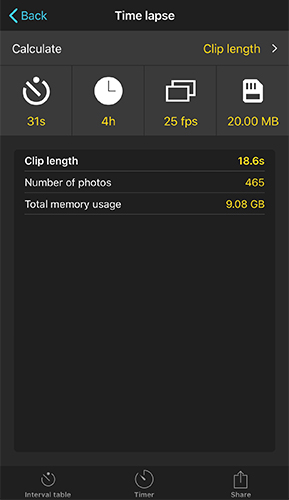
Time lapse calculator solving for clip length: 31s interval, 4h event duration, 25fps, 20MB per photo, resulting in 18.6s clip, 465 photos, 9.08GB total
A 4-hour shoot at a 31-second interval becomes an 18.6-second clip

Pick which of the three you want to solve for — shooting interval, clip length, or event duration — and PhotoPills fills in the rest, along with how many photos you'll need and how much memory card space to bring.
Field Photography · PhotoPills
Three Things, Pick Two
  1. ⏱️
    Shooting interval
    The gap between two consecutive photos.
  2. 🎬
    Clip length
    How long the finished time lapse video plays for.
  3. 📅
    Event duration
    The total real-world time you'll spend shooting.

Tap Calculate to choose which one you're solving for, then fill in the other two plus your frame rate and file size — the settings box handles the rest.

Field Photography · PhotoPills
Don't Know Your Interval? Check The Table
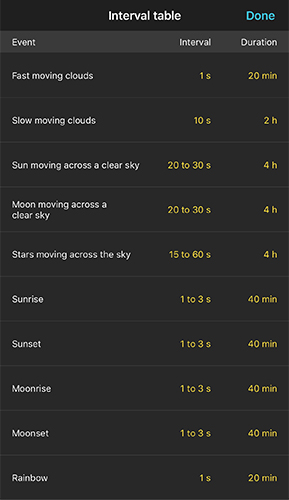
Interval table listing recommended shooting intervals and durations for fast/slow moving clouds, sun/moon/stars moving across a clear sky, sunrise, sunset, moonrise, moonset, and rainbows
A starting point for nine of the most common time lapse subjects

Never shot a time lapse of this particular subject before? The Interval Table gives you a tested starting interval and typical duration — from fast-moving clouds (1 second) to a slow sunset (1–3 seconds over 40 minutes).
Field Photography · PhotoPills
Faster Subject, Shorter Interval

The pattern in the Interval Table isn't random — the faster something moves across the frame, the shorter your interval needs to be to keep the motion looking smooth instead of jumpy.

  1. 💨
    Fast-moving clouds
    Just 1 second between shots — they move fast.
  2. ☁️
    Slow-moving clouds
    10 seconds is plenty — much less happens frame to frame.
  3. 🌅
    Sunrise or sunset
    1–3 seconds over a 40-minute window captures the gradual light change smoothly.
Field Photography · PhotoPills
Watch Your Memory Usage
💾
465 photos adds up fast
In the earlier example, 465 photos at 20MB each comes out to 9.08GB — check this number before you head out so you're not swapping cards mid-shoot.

The calculator's Total memory usage result accounts for your image size setting, so you know exactly how much card space (and battery) to plan for before committing to a long event duration.

Field Photography · PhotoPills
The Timer: Keeping You On Track
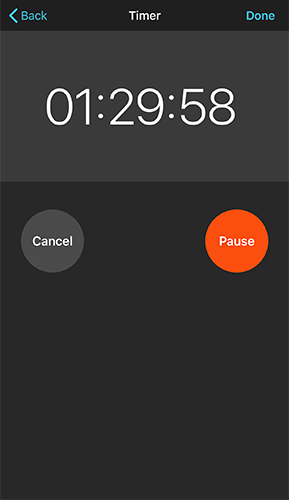
Timer screen showing a running countdown of 01:29:58 with Cancel and Pause buttons
A live countdown while your time lapse runs

You've already met this Timer in the Exposure, Star Trails, and Spot Stars lessons — it's the same tool everywhere. Start it once your interval shooting begins and it counts down the full event duration, so you know exactly when to pack up.

Field Photography · PhotoPills
Planning A Time Lapse
  1. 1
    Pick your subject
    Clouds, a sunset, star movement — whatever you're shooting.
  2. 2
    Get a starting interval
    Check the Interval Table if it's your first time with this subject.
  3. 3
    Solve for what you need
    Plug it into the calculator to get clip length, event duration, or interval — whichever you didn't already know.
  4. 4
    Check your memory card
    Confirm you've got the storage for the number of photos calculated.
  5. 5
    Start the Timer
    Shoot, and let it count down the event duration for you.
Field Photography · PhotoPills
A Worked Example

Say you want a time lapse of fast-moving clouds over the mountains for a club meeting presentation.

  1. 1
    Interval Table says
    1 second interval, 20 minutes duration is the recommended starting point.
  2. 2
    Calculate clip length
    1s interval, 20 min duration, 25fps → about a 48-second clip.
  3. 3
    Check memory
    1,200 photos at your camera's file size — do the math before you start shooting.
Field Photography · PhotoPills
You Can Plan A Time Lapse Now
1
3 numbers
Interval, clip, duration
2
Interval Table
9 subjects, ready to use
3
Memory
Check it before you go
4
Timer
Same one, every lesson
UP NEXT
Lesson 13: More Calculators
Three smaller tools worth knowing about — the standalone Field of View calculator, Subject Distance, and Focal Length Match.
⌂ Index