Field Photography · PhotoPills · Lesson 7 Exposure & Depth of Field Calculators
1 / 10
Field Photography · PhotoPills
Exposure & Depth of Field Calculators
These tools don't need a map, a date, or a location — just your camera and a math problem. Two calculators that take the guesswork out of long exposures and sharp focus.
⏱️
Exposure
Work out equivalent exposure times for ND filters, low light, and night.
🎯
Depth of Field
Control exactly what's sharp — and by how much.
Field Photography · PhotoPills
The Exposure Calculator
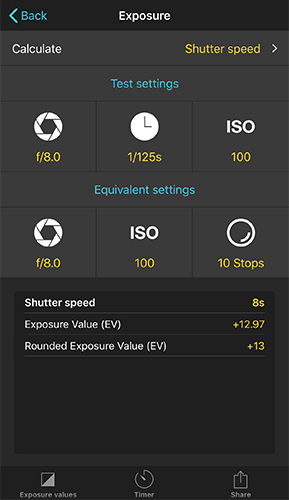
Exposure calculator showing test settings of f/8, 1/125s, ISO 100 and equivalent settings with a 10-stop ND filter resulting in an 8 second shutter speed
Test settings in, ND filter accounted for, final shutter speed out

Screw on a 10-stop ND filter and your camera's meter is useless. This calculator does the math for you — take a normal test shot, tell PhotoPills what filter or settings you're switching to, and it works out the equivalent shutter speed.
Field Photography · PhotoPills
Using The Exposure Calculator
  1. 1
    Take a test shot
    Without the ND filter, find settings that expose the scene correctly.
  2. 2
    Enter those as "Test settings"
    Aperture, shutter speed, and ISO from the test shot.
  3. 3
    Enter your final settings
    The aperture and ISO you actually want, plus the ND filter's stop count.
  4. 4
    Read the result
    The calculated shutter speed — the exposure time you actually need.
Then start the Timer
Tap the Timer tab to get a notification the moment your long exposure should end.
Field Photography · PhotoPills
Classic Depth of Field Calculator
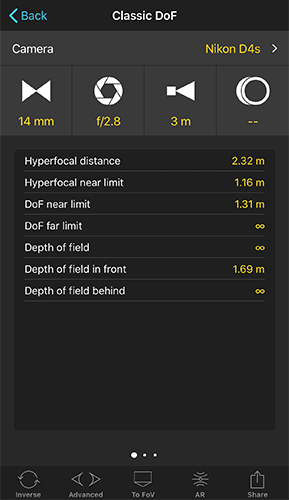
Classic Depth of Field calculator showing hyperfocal distance, DoF near limit, and DoF far limit for a 14mm lens at f/2.8
Camera + focal length + aperture + focus distance = a full DoF breakdown

Enter your camera, focal length, aperture, and focus distance — get back the hyperfocal distance and exactly how much of the scene, in front of and behind your focus point, will be acceptably sharp.
Field Photography · PhotoPills
Inverse DoF: Work Backward
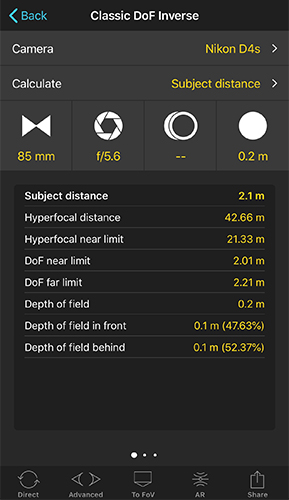
Inverse Depth of Field calculator calculating the subject distance needed for a desired depth of field
Tell it the DoF you want — it tells you the setting to get there

Sometimes you know the result you want but not the setting. Inverse mode flips the calculation: pick focal length, aperture, or subject distance to solve for, tell it your desired depth of field, and it works out the missing piece.
Field Photography · PhotoPills
Advanced: Circle of Confusion
Optional, for when you want to define "acceptably sharp" yourself instead of trusting the default.

The Circle of Confusion (CoC) is the technical setting behind every DoF calculation — it defines how big a blur spot can be before it stops looking sharp. The Advanced calculator lets you tune it based on your print size, viewing distance, and how sharp your eyes need it to look.

🤷
Most people never touch this
The default CoC works fine for typical prints and screens. This is here if you're printing huge or pixel-peeping.
Field Photography · PhotoPills
DoF Table: See It All At Once
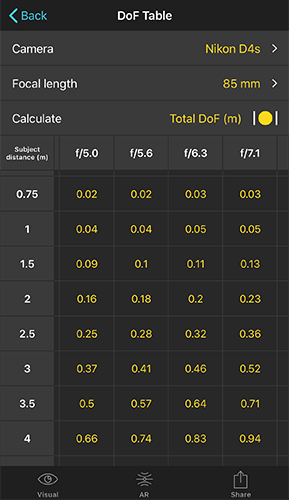
Depth of field table showing total depth of field for various subject distances and apertures at 85mm
Subject distance down the side, aperture across the top

Instead of calculating one combination at a time, the DoF Table lays out total depth of field for a whole grid of subject distances and apertures at once — great for comparing options before you commit to settings.
Field Photography · PhotoPills
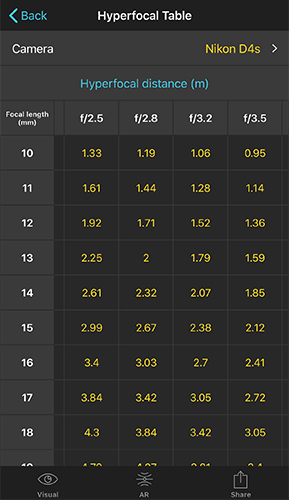
Hyperfocal Table: The Landscape Cheat Sheet
Hyperfocal table showing hyperfocal distance for various focal lengths and apertures
Focal length down the side, aperture across the top

Focus at the hyperfocal distance and everything from half that distance out to infinity is sharp — the classic landscape trick. This table gives you that distance for any focal length and aperture combination, without opening a calculator each time.

Field Photography · PhotoPills
Putting It Together
  1. 🌄
    Shooting a landscape?
    Check the Hyperfocal Table for your lens and aperture, focus there, and everything from the midground to the horizon is sharp.
  2. 🌌
    Shooting a long exposure or ND filter shot?
    Take a test shot, run it through the Exposure calculator, then start the Timer.
  3. 🎯
    Need a very specific DoF?
    Use Inverse to solve for the exact aperture or distance that gets you there.
Field Photography · PhotoPills
Your Camera Math Is Covered
1
Exposure
ND filters, long exposure
2
Classic DoF
Settings → sharpness
3
Inverse DoF
Sharpness → settings
4
Tables
DoF & Hyperfocal at a glance
UP NEXT
Lesson 8: Star Trails & Spot Stars
Two more calculators, purpose-built for night photography — one for trailing the stars on purpose, one for keeping them as sharp points of light.
⌂ Index