Field Photography · PhotoPills · Lesson 1 Getting Started with PhotoPills
1 / 10
Field Photography · PhotoPills
Getting Started With PhotoPills
A planning app that tells you exactly where the Sun, Moon, and Milky Way will be — before you ever leave the house. This series walks through it tool by tool.

PhotoPills is a phone app built for outdoor and night photographers. Point it at a date, a time, and a spot on the map, and it tells you where the Sun rises, where the Milky Way arches, when golden hour starts, and dozens of other things you'd otherwise have to guess at in the field.

💵
It's a paid app
One-time purchase, available for iPhone and Android. Not required for the club, but extremely popular with landscape and night photographers.
📸
Screenshots courtesy of PhotoPills
This series is built from the official PhotoPills User Guide, used with permission. The app has been updated since this guide was written, so a screen or two may look slightly different than what you see on your phone — the underlying idea stays the same.
Field Photography · PhotoPills
Step 1: Turn On The Widgets
Do this before you do anything else
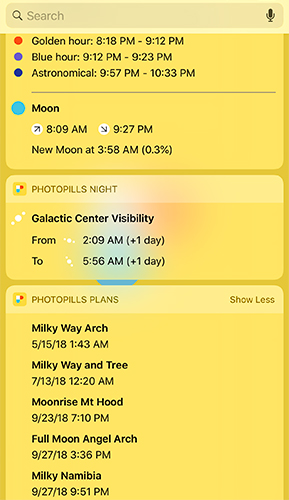
The Widgets put the Sun, Moon, and Milky Way info for right now, right where you are, on your home or lock screen — no need to even open the app.
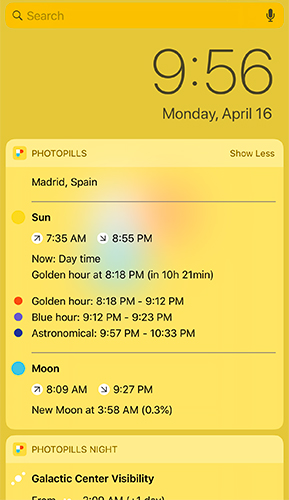
PhotoPills widget showing sunrise/sunset, golden hour, blue hour, and moon info
Sun, light & Moon info
PhotoPills widget showing Galactic Center visibility and upcoming saved plans
Milky Way & your saved plans

They work offline, too. Add them from your phone's widget screen — search for "PhotoPills" among the available widgets and drag one onto your home screen.
Field Photography · PhotoPills
Set A Goal First
🎯
Don't try to learn every tool at once
PhotoPills packs in a lot — it's easy to feel overwhelmed the first time you open it, the same way a new camera menu can be overwhelming.

Before you open the app, ask yourself one simple question:

"What do I want to know?"

Do you want to know when the Sun sets tonight? Whether the Milky Way will be visible this weekend? How much depth of field you'll get at f/8? Pick one goal, find the matching tool in this series, and learn that one thing well. The rest will make a lot more sense once you have a first win under your belt.

Field Photography · PhotoPills
The Three Menus
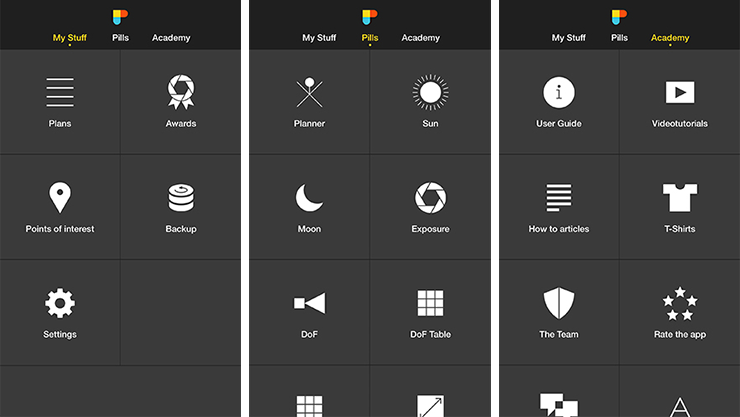
The three PhotoPills menus: My Stuff, Pills, and Academy
Swipe left/right (or tap the menu name) to switch between My Stuff, Pills, and Academy
🗂️
My Stuff
Your saved plans, locations, and settings.
💊
Pills
All the planning tools and calculators — where the real work happens.
🎓
Academy
The user guide, video tutorials, and how-to articles.
Field Photography · PhotoPills
Pills Menu: The Planning Tools
  1. ☀️
    Planner
    The big one — plan any Sun, Moon, Eclipse, Milky Way, or Star Trails shot on a map.
  2. 🌙
    Sun & Moon
    Quick daily info — rise/set times, golden hour, moon phase — without opening the full Planner.
  3. 📷
    Exposure, DoF & Field of View
    Calculators for long-exposure timing, depth of field, and how much of a scene your lens will capture.

We'll dedicate a full lesson to each of these — this is just the map of what's there.

Field Photography · PhotoPills
Pills Menu: The Night & Specialty Tools
  1. 🌌
    Night AR
    Point your phone at the sky and see the Milky Way, Moon path, and Star Trail patterns overlaid on the real world.
  2. ☄️
    Meteor Showers
    Calendar and visibility info for every meteor shower of the year.
  3. Star Trails & Spot Stars
    Figure out exposure times for trailing stars — or for keeping them as sharp points of light.
  4. 🎬
    Time Lapse & Timer
    Plan shooting intervals and get an alert when a long exposure finishes.
Field Photography · PhotoPills
My Stuff: Your Plans & Places

Every time you build a shot in the Planner, you can save it — that saved shot is called a Plan. Save a location you love, and it becomes a Point of Interest you can jump back to instantly next time.

  1. 📋
    Plans
    Your to-do list of planned photos — the shots you've saved with the Planner.
  2. 📍
    Points of Interest
    Saved locations you shoot at often.
  3. 💾
    Backup
    Export your Plans and Points of Interest to a file so you never lose them.
Field Photography · PhotoPills
Academy: Keep Learning

The Academy tab is PhotoPills' own built-in classroom — worth knowing about even though this LeConte series will cover the same tools in more depth.

📖
User Guide
The full manual this lesson series is based on.
🎥
Video Tutorials
Short walkthroughs of specific tools.
📝
How-To Articles
Deeper dives into photography techniques.
Field Photography · PhotoPills
Quick Reference: What Pill Do I Need?
The PhotoPills guide calls this "tell us your pain, we'll tell you the pill" — here are the questions club members ask most.
If you want to know...
Open this
When the Sun sets tonight
Sun (Pills)
The Moon phase this week
Moon (Pills)
If the Milky Way will be up Saturday night
Planner → Panel 7/8
Your depth of field at f/8
DoF (Pills)
Exposure time with an ND filter
Exposure (Pills)
How long before stars start to trail
Spot Stars (Pills)
When the next eclipse is visible from home
Planner → Panel 9/10
Field Photography · PhotoPills
You're Ready To Dig In
1
Widgets on
Sun/Moon at a glance
2
Pick a goal
Don't learn it all at once
3
3 menus
My Stuff, Pills, Academy
4
Save your work
Plans & Points of Interest
UP NEXT
Lesson 2: The Planner — Your Command Center
The Planner is where almost everything else in this series happens. Next lesson covers the Red Pin, the Map, and the Time Bar — the three things you'll touch on every single plan.
⌂ Index